Installing your Lightroom Presets could not be any easier. I have been using Lightroom for a very long time, and I love the ease of use. The really make it easy for anyone to get in there and start beautifying your images.
Installing Lightroom Presets is no different. You will be up and running in no time at all.
In these videos, I will show you how to install your new Lightroom Presets. This will with any Lightroom you may have. Just follow along, and you will be up and running in no time.
Recently Lightroom has moved away from the original .lrtemplate to a new .xmp format and installing it just got easier. The reason they made the change was that the presets can now be synchronized among all your devices.
How to install .xmp Lightroom Presets
1. In Lightroom, go to the Develop Module and got to the Presets Panel on the left side.
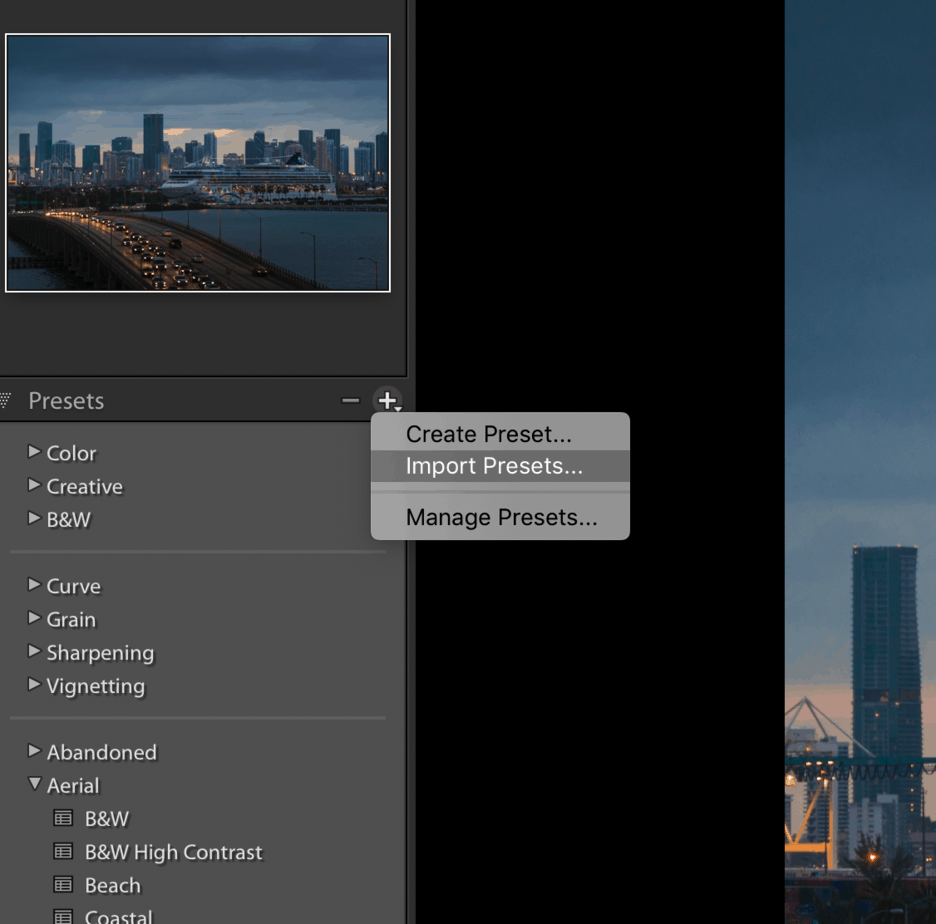
2. Click the “+” Icon on the right side of the panel and select the Import Presets option.
3. Navigate to the location on your computer where you saved the zipped file with the presets (usually in your download folder), select it and click the Import button. Please note that this will only work with .xmp files and only with a Zipped folder.
If you want to install the. .Irtemplate please go to the steps below.
How to Install Lightroom Presets in Lightroom CC:
https://youtu.be/UgbYGtJUIQc
How to Install Lightroom Presets in Lightroom Classic:
https://www.youtube.com/watch?v=Z1-5K6dfWY4
Remember that all the presets you ever install can always be deleted by simply reversing the process. Lightroom Presets can also be adjusted and modified to suit your needs. It does not matter what you want to do to them remember that the sky is the limit.
After you make your own adjustments to your Lightroom Presets al you have to do is go to the left-hand column and right click. Then just click on “update preset with the current setting.” Just like that, you will have your own editing style.
Fine Art Photography Prints
Own a museum-quality archival print by Edin Chavez
Hahnemühle archival paper · From $95
BROWSE PRINTS LIMITED EDITIONS